How SiteVoice Works
Three simple steps to transform your site inspections. Record, review, and share. No training needed.
Overview
SiteVoice replaces clipboards, WhatsApp threads, and late-night report writing with a simple voice-powered workflow. Walk your site, speak your observations, and let AI handle the rest.
The entire process works in three steps:
- Walk and Speak: Record defects one at a time, hands-free as you inspect
- Review & Refine: AI categorises each defect by trade, ready for your review
- Share Reports: Generate professional reports or shareable links in one click
No training is required. If you can describe a defect out loud, you can use SiteVoice.
Step 1: Walk and Speak
Hold the record button on your phone or tablet and describe a defect as you see it. SiteVoice captures every detail through your voice. No stopping to type, no illegible handwriting, no photos out of order.
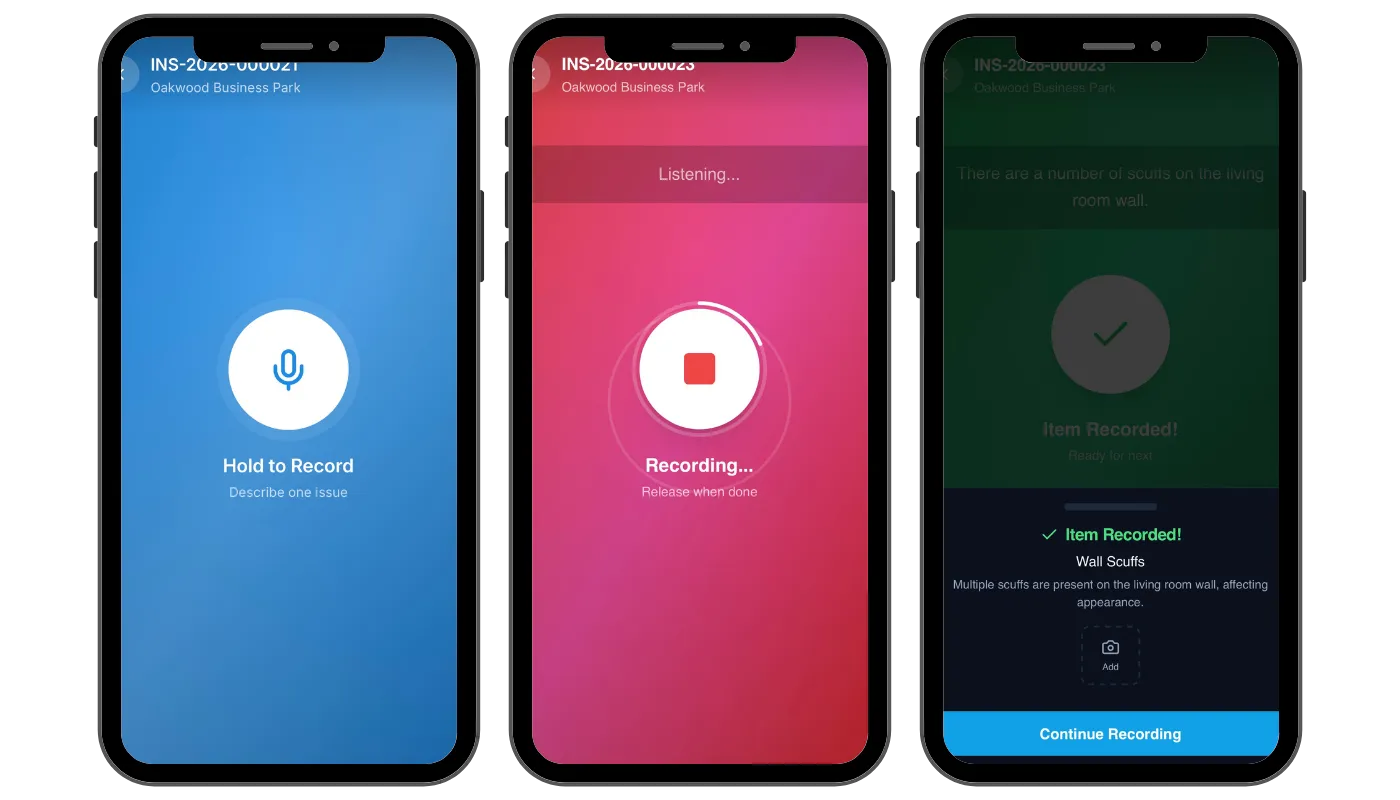
How voice recording works
When you hold the Record button, SiteVoice activates your device microphone and begins capturing audio. A live waveform visualiser gives you real-time feedback so you know the mic is picking up your voice clearly.
Each recording captures a single defect item. Describe one issue, release the button, and SiteVoice processes it instantly. Then move on to the next defect and record again. This keeps each item focused and accurately categorised.
Key features
Hands-free recording
Keep your hands free to point, measure, or take photos while you speak.
Multi-device support
Record on your phone, review on your tablet, and generate reports from your desktop, all in sync.
High accuracy
Our AI transcription understands accents, slang, and trade-specific jargon used on UK sites.
Step 2: Review & Refine
As each recording is processed, SiteVoice's AI extracts the defect from your description and automatically categorises it into one of your company's trade categories — we seed around 24 UK construction presets (plumbing, electrical, joinery, painting, roofing, and more) that you can rename, recolour, add to, or remove.
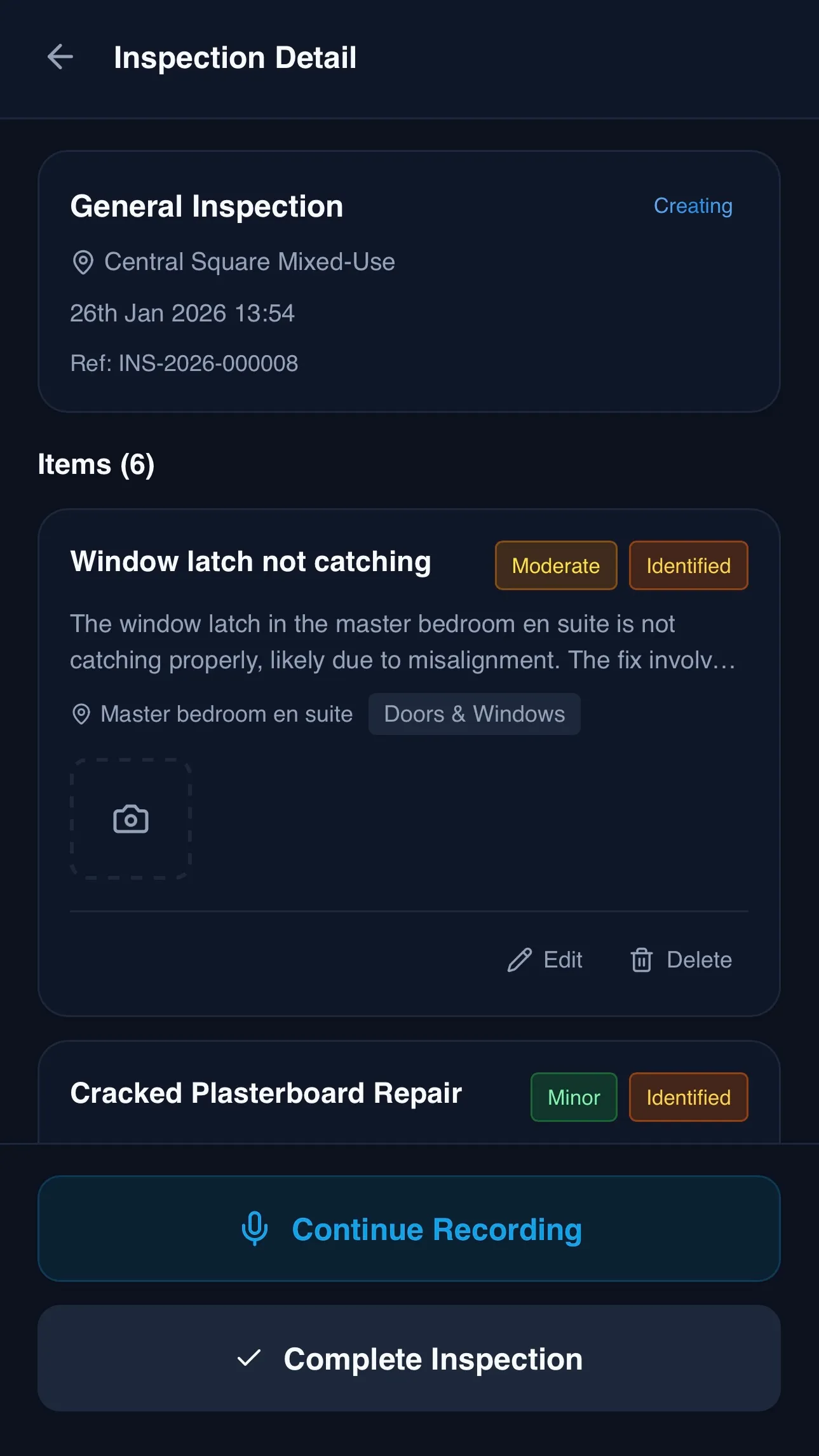
AI-powered extraction
The AI doesn't just transcribe, it understands context. If you say "the kitchen tap in plot 12 is dripping", SiteVoice creates a defect item tagged Plumbing with the location set to Plot 12, and assigns a difficulty rating. Each recording is processed into a single, focused item with the right trade category and location automatically assigned.
Edit anything inline
Every AI-generated item is fully editable. Change the description, reassign the trade category, update the status, or add notes. You can also attach photos directly to individual defect items so each image is linked to the right issue.
Trade categories
SiteVoice seeds your account with around 24 UK construction trade categories, which your company can rename, recolour, add to, or remove:
Step 3: Share Reports
Generate professional, branded reports in one click. SiteVoice produces clean PDF documents and shareable web links that contractors, clients, and compliance officers can access instantly.
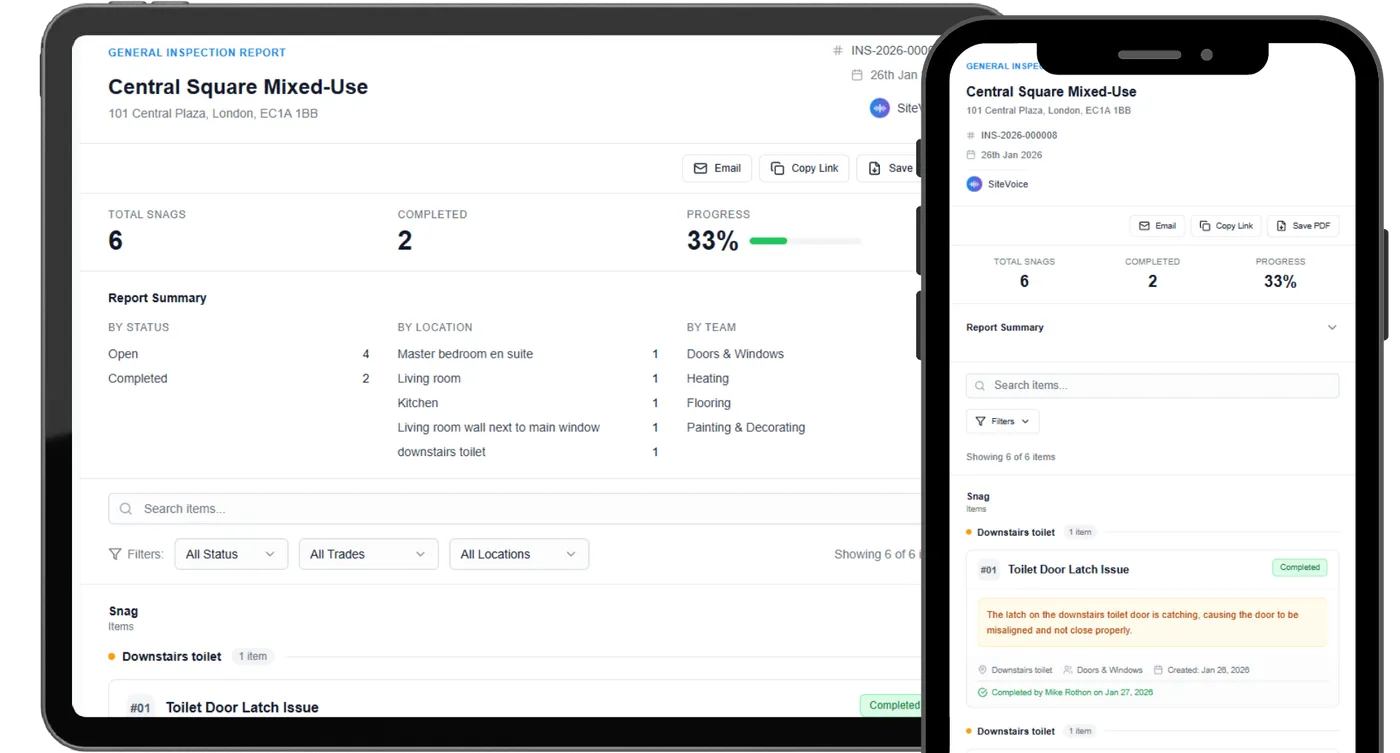
PDF reports
Each report includes a summary of findings, individual defect items grouped by location, attached photos, status indicators, and a complete audit trail. Reports are formatted for professional presentation and Building Safety Act 2022 compliance.
Shareable links
Create secure, shareable links for any inspection. Anyone with the link can view the report in their browser without needing a SiteVoice account. Contractors and operatives you've invited sign off completed items from their own SiteVoice app — see Roles & Sign-off below.
One-click PDF
Professional reports generated instantly.
Shareable links
Secure links anyone can access.
BSA 2022 compliant
Full audit trail for compliance.
Roles & Sign-off
SiteVoice isn't just for the person holding the phone. Site managers, the contractors they work with, and those contractors' own operatives each get a tailored view — and everyone sees only what's relevant to them.
Scoped access
When you invite a contractor as a trade lead, they're assigned to specific site-and-trade pairs. They see only those sites and trades, never the rest of your account. Contractors can then add their own operatives, who see only the individual items assigned to them.
Dedicated mobile apps
Contractors and operatives get purpose-built mobile apps. A contractor sees the work landing on their trades and manages their team; an operative sees a simple to-do list of the jobs assigned to them across every builder they work for.
The sign-off lifecycle
Every inspection moves through a clear lifecycle — Open → Ready for sign-off → Signed off — recording who signed it off and when for your audit trail. Operatives action and sign off their items on site, so the loop closes without a single phone call.
Site managers
Inspect by voice, review, assign work and sign off.
Contractors
Scoped to their sites and trades; notified by email; manage their own operatives.
Operatives
See only the jobs assigned to them; action and sign off from a mobile app.
Dashboard & Insights
Once your inspections are complete, SiteVoice gives you a real-time dashboard that turns raw data into actionable insights. Track trends, monitor your team's activity, and spot bottlenecks at a glance — no spreadsheets required.
At-a-glance stat cards
The top of your dashboard displays four key metrics, each with a trend indicator comparing the current period to the previous one:
- Inspections Completed — total inspections with a period-over-period trend percentage
- Sites — number of active sites in your organisation
- Open Items — outstanding defect items with a trend indicator showing whether the backlog is growing or shrinking
- Inspections Remaining — quota usage displayed as a colour-coded progress bar so you always know where you stand
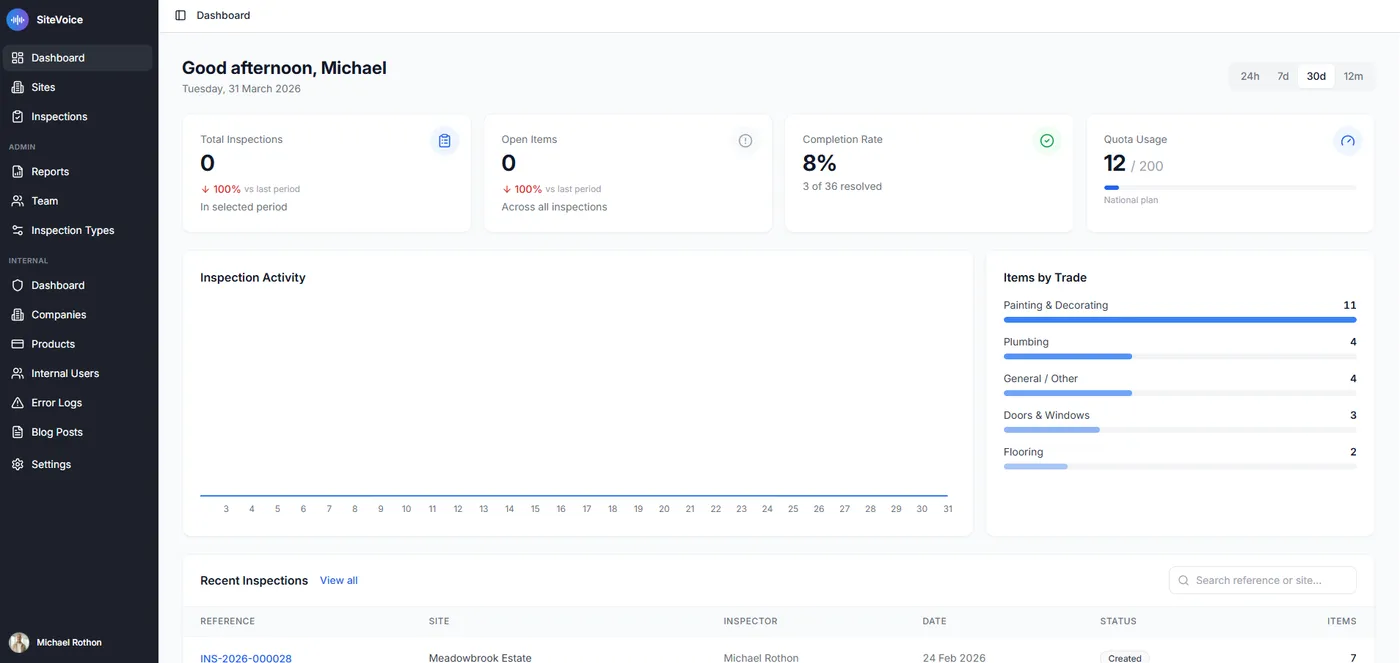
Activity charts
Below the stat cards, interactive charts visualise your inspection activity over time. Four chart types give you different perspectives on your data:
- Inspection Activity — an area chart showing inspection volume over time
- Daily Inspections — a granular day-by-day breakdown
- Daily Snag Items — tracks how many defect items are being recorded each day
- Snag Comparison — a bar chart comparing new items raised versus items completed, so you can see if your team is keeping up
Quick summary panel
A compact summary panel sits alongside the charts, showing your Completion Rate %, Average Items per Inspection, Most Active Site, and a compact quota usage bar. These figures update automatically as new inspections are processed.
Time period filtering
Toggle between 24 hours, 7 days, 30 days, and 12 months to zoom in or out on your data. All stat cards, charts, and summaries update instantly when you switch time periods.
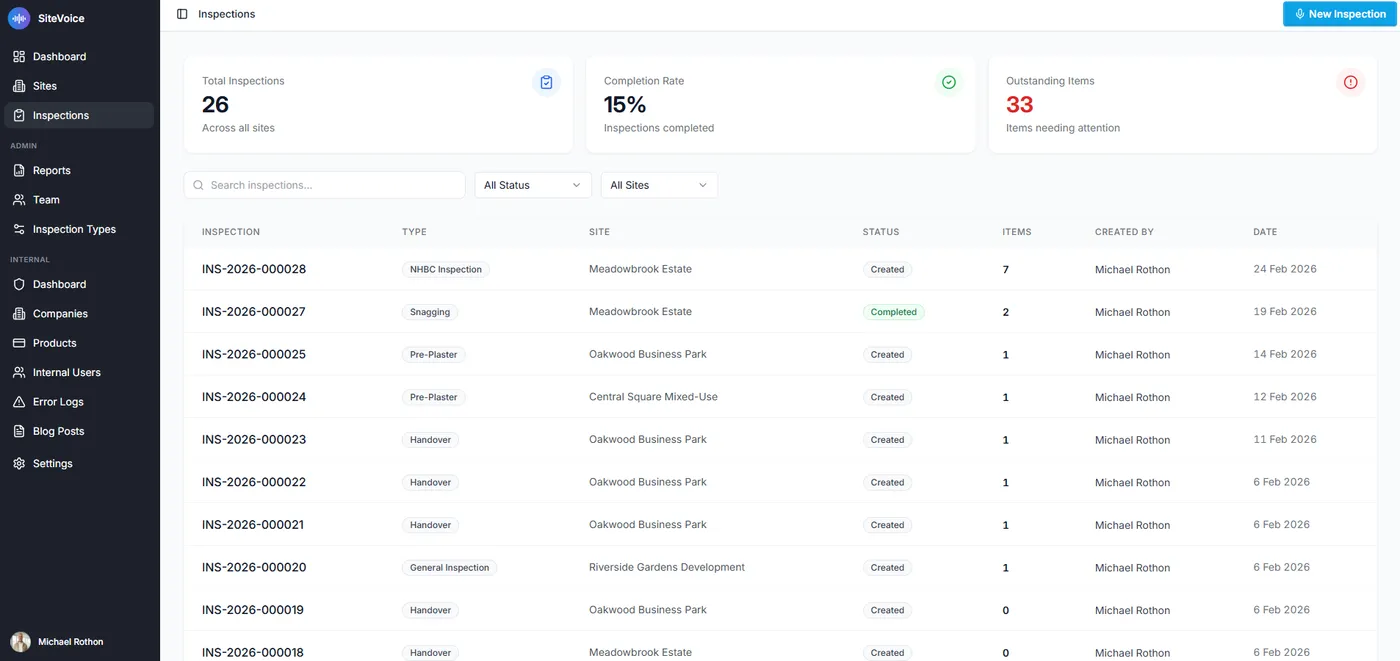
Recent inspections table
At the bottom of the dashboard, a paginated table lists your most recent inspections. Filter by status (Created, Transcribing, Analysing, Completed) or creator to find specific inspections quickly. Colour-coded status badges make it easy to scan for items that need attention.
Trend tracking
Sparkline charts and period-over-period percentages show whether metrics are improving.
Interactive charts
Area charts and bar charts with tooltips let you explore your data visually.
Quick summary
Completion rate, average items per inspection, and most active site at a glance.
Time period filters
Switch between 24h, 7d, 30d, and 12m views with instant updates.
Filterable tables
Filter inspections by status and creator to find what you need fast.
Quota monitoring
Colour-coded usage progress bar shows OK, Warning, Critical, and Blocked states.
AI Technology
SiteVoice uses a multi-stage AI pipeline to transform your voice recordings into structured inspection data. Here's what happens behind the scenes:
Transcription
Audio recordings are processed by advanced speech-to-text AI, which delivers excellent accuracy for transcription. It handles UK accents, construction terminology, and noisy site environments with ease, and works consistently across all browsers.
Defect extraction
Once transcribed, the text is analysed by AI to extract the defect item. The model identifies the issue from your description, assigns the appropriate trade category, and structures the item with a clear name, description, location, and difficulty rating.
Processing pipeline
Audio upload
Recording sent securely to our servers
Format conversion
Audio optimised for transcription
Transcription
Speech-to-text AI generates a transcript
AI extraction
Defect item extracted with trade category
Review ready
Structured item available for editing
Multi-Device Support
SiteVoice works on any device with a browser, including phones, tablets, and desktops. Record inspections on your phone while on site, then switch to your tablet or laptop to review items, attach photos, and generate reports.
Your data syncs across devices automatically. Start an inspection on one device and pick up where you left off on another.
Security & Compliance
SiteVoice is built with enterprise-grade security and designed for Building Safety Act 2022 compliance from the ground up.
Encryption in transit
All data transmitted over HTTPS/TLS. Audio, transcriptions, and reports are encrypted between your device and our servers.
Multi-tenant isolation
Each company's data is logically separated. Users can only access inspections belonging to their own organisation.
Secure authentication
JWT tokens with short expiry, password hashing, account lockout after failed attempts, and CSRF protection.
BSA 2022 audit trail
Every action (inspections created, items added, statuses changed) is logged for Building Safety Act compliance.
GDPR compliance
We process personal data in accordance with the UK General Data Protection Regulation (UK GDPR) and the Data Protection Act 2018. Audio recordings are processed by OpenAI and Deepgram under appropriate data processing agreements. We do not sell your data or use it for advertising. See our Privacy Policy for full details.
Ready to try it?
Get started with 20 free inspections and see the difference voice-powered workflows make.
Start Free — 20 Inspections20 free inspections · No credit card required